Account Contact
Je winkelwagen
Black Weektot −30 %nog 3 d 01:51:33
DPD & FedEx – bezorgdatum op de productpagina.
Hulp nodig? DistriNode AI helpt je met alles op onze site.

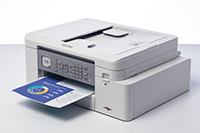
Brother MFC-J4340DWE multifunctionele printer inkjet A4 1200 x 4800 DPI Wi-Fi

Brother MFC-J4340DWE multifunctionele printer inkjet A4 1200 x 4800 DPI Wi-Fi
-9%
Black Week
Brother MFC-J4340DWE multifunctionele printer inkjet A4 1200 x 4800 DPI Wi-Fi
516,39 €
565,98 €−9%
PDF
PDF
Voorraad 1 Code 31195 Model MFC-J4340DWE Garantie 2 jaar

Bezorging & retourneren

Verwachte bezorgdatum dinsdag 8 december
Je blijft op de hoogte via ons uitgebreide trackingsysteem
Betaalopties
BetaalkaartVisaMastercardApple PayGoogle PayBankoverschrijving

Stel een vraag – de AI-assistent antwoordt direct.

Omschrijving

Available at Argos!Purchase the MFC-J4340DWE and receive:A powerful device with print, copy, scan and fax functionality, as well as a wide range of connectivity optionsA FREE 4 month EcoPro subscription trialAutomatic FREE delivery of Brother original ink suppliesA lifetime warranty support for your printerNow you will never run out of ink with a straight forward ink delivery subscription.Recycle your empty ink cartridges for FREE, responsibly protecting the environment. Brother has a zero waste to landfill policy for empty cartridges returned and for every Brother supply returned to us we donate to our rainforest-saving charity partner Cool Earth. By recycling, you're protecting the environment and supporting the rainforest with Cool Earth. Better for you, better for the planet, a better way to print.
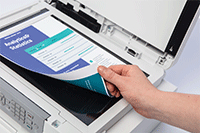
Scanning technology to improve work flow, even when working remotely

Scanning technology to improve work flow, even when working remotely

As a multifunction device this machines does so much more than print. The scanning opportunities available for example can significantly enhance your productivity from home. You can scan in colour or mono at high speeds to several destinations to boost workflow:ImageFileOCREmail

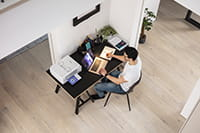
Professional print quality and efficiency from the comfort of your home

Your workplace may be at home but that should not mean print quality should be compromised. With the MFC-J4340DW you can expect print quality of the highest order, at quick, hassle-free speeds.If you’re working on large documents, these multifunction devices give you the opportunity to print focus on your work while it processes your documents. Whether it’s printing double sided automatically, thus saving the environment and paper, or using the automatic document feeder for multipage scanning it’s sure to improve your efficiency.
Professional print quality and efficiency from the comfort of your home
Automated supplies delivered free

Automated supplies delivered free

Sign up to the FREE EcoPro trial and supplies are ordered automatically, so you never run out of ink.If you don’t use all your plan pages in a month, the unused pages will be kept in your account and automatically rolled over to the next month.

Easy management with Brother Mobile Connect

Fully manage your subscription with the Brother Mobile Connect app. Download the app to fully operate your Brother printer from anywhere. Brother Mobile Connect provides intuitive, time saving functionality to fit seamlessly into a busy life. Download the Brother Mobile Connect app to easily print from anywhere, manage your ink levels and fully operate your Brother printer from your mobile device.
Easy management with Brother Mobile Connect
Easy recycling with Brother

Easy recycling with Brother

You can also return your used cartridges back to us to be recycled, absolutely free of charge.With EcoPro, you'll get a free postage label with every ink and toner cartridge you receive.

What is an EcoPro subscription plan?

EcoPro is a better way to print for home offices and small businesses, with automatic free ink delivery direct to your door. It’s a subscription plan that helps you save on ink costs, offers warranty and ongoing service support for your printer, whilst focusing on reducing waste through recycling empty ink cartridges.
What is an EcoPro subscription plan?
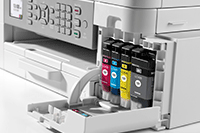
Keep on top of your ink useage, quickly and easily

Keep on top of your ink useage, quickly and easily

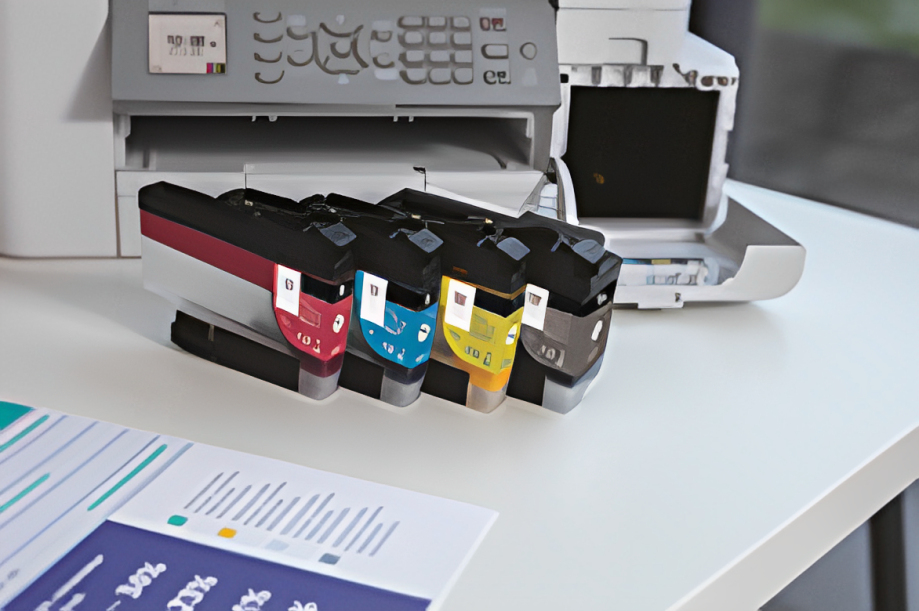
We’ve reengineered our ink cartridges to hold more ink and created an internal ink storage tank that delivers more pages of uninterrupted printing without sacrificing the compact, desktop size. Also, thanks to the page gauge feature you can check remaining ink levels on your LCD display to help avoid interrupted printing.

EcoPro printing warranty

Protected by EcoPro warranty you can feel secure with the reassurance that quality of product is maintained.EcoPro subscription protects your printer warranty maintaining and supporting your printing needs.
EcoPro printing warranty

How to use

Unbox the Brother MFC-J4340DWE, install the supplied ink cartridges and connect the device to your Wi‑Fi network or a computer following the quick start guide. Load A4 paper into the tray and select duplex options in the printer settings when double-sided copies or scans are required. Use the control panel or Brother’s mobile app/software to initiate print, copy, scan or fax tasks.

Recommendations

Use genuine Brother inks and enrol in the EcoPro automatic ink delivery to maintain print quality and ensure warranty coverage. Recycle empty cartridges through Brother’s free programme to reduce environmental impact.

Belangrijkste kenmerken
  • Print, copy, scan & fax functionality
  • Automatic 2-sided printing
  • Wireless / mobile connectivity
  • 20 sheet automatic document feeder
  • Print speeds: 20 / 19ipm mono/colour (Based on ISO/IEC 24734)
  • 4.5cm LCD colour display
  • Home & office Inkjet Colour printing
  • 1200 x 4800 DPI
  • Printing colours: Black, Cyan, Magenta, Yellow
  • A4
  • Colour copying Colour scanning Colour faxing
  • Apple AirPrint, Brother iPrint & Scan, Mopria Print Service
  • Direct printing
  • USB port Wi-Fi
  • Internal memory: 128 MB Built-in processor 576 MHz
  • 8.83 kg

Specificaties

Specificaties
Aanbevolen werkcyclus
250 - 2000 pagina's per maand
Aantal printcartridges
4
Aantal USB 2.0-poorten
2
Afdrukkleuren
Zwart, cyaan, magenta, geel
Automatische documentinvoer (ADF)
Ja
Bedieningstype
Knoppen
Beelddiagonaal
4.57 cm (1.8")
Beeldscherm
LCD
Beschikbaarheid reserveonderdelen
5 jaar
Beveiligingsalgoritmen
64-bit WEP, 128-bit WEP, EAP-FAST, EAP-TLS, EAP-TTLS, PEAP, SSID, SSL/TLS, WPA-PSK, WPA2-PSK
Boekjes printen
Ja
Breedte
435 mm
Breedte verpakking
495 mm
Brutogewicht pallet
243.3 kg
Brutohoogte pallet
14.8 cm
Cartridge(s) inbegrepen
Ja
Diepte
360 mm
Diepte verpakking
242 mm
Direct printen
Ja
Dubbelzijdig kopiëren
Ja
Dubbelzijdig printen
Ja
Dubbelzijdig scannen
Ja
Duplexfuncties
Kopiëren, afdrukken, scannen
Duurzaamheidscertificaten
Blue Angel
Enveloppenformaten
C5, Com-10, DL, Monarch
Ethernet LAN
No
Faxen
Kleurenfaxen
Faxgeheugen
180 pagina's
Faxverzendsnelheid
14400 sec/pagina
Formaten ISO A-serie (A0...A9)
A4, A5, A6
Fotopapierformaten
9x13,10x15,13x18
Geluidsdrukniveau (printen)
57 dB
Gewicht
8.83 kg
Gewicht verpakking
10.7 kg
Grijstinten
256
Grijswaardendiepte invoer
10 bit
Grijswaardendiepte uitvoer
8 bit
Hoogte
180 mm
Hoogte verpakking
455 mm
Ingebouwd display
Ja
Ingebouwde processor
Ja
Intern geheugen
128 MB
Invoercapaciteit automatische documentinvoer (ADF)
20 vellen
Invoercapaciteit papierlade 1
150 vel
ISO C-formaten (C0...C9)
C5
Kabels inbegrepen
AC
Kleurdiepte invoer
30 bit
Kleurdiepte uitvoer
24 bit
Kopieerformaat aanpassen
25 - 400%
Kopiëren
Kleurenkopiëren
Lagen per pallet
3 pc(s)
Land van herkomst
Filipijnen
Marktpositionering
Home & office
Maximaal aantal kopieën
99 kopieën
Maximaal kopieerformaat
A4
Maximaal papierformaat ISO A-serie
A4
Maximaal scanbereik
213.9 x 295 mm
Maximale kopieerresolutie
1200 x 2400 DPI
Maximale resolutie
1200 x 4800 DPI
Maximale werkcyclus
30000 pagina's per maand
Mediagewicht multifunctionele lade
64 - 300 g/m²
Mediagewicht papierlade
64 - 220 g/m²
Mediatypen papierlade
Glanzend papier, normaal papier, gerecycled papier
Modus dubbelzijdig kopiëren
Auto
Modus dubbelzijdig printen
Auto
Modus dubbelzijdig scannen
Handmatig
Multifunctionele lade
Ja
N-in-1-kopieerfunctie
Ja
N-in-1-kopieerfunctie (N=)
2, 4
N-in-1-printfunctie
Ja
N-up-printen
2, 4, 9, 16
Niet-ISO-afdrukformaten
Legal, Letter
Omdozen per pallet
21 pc(s)
Omdozen per palletlaag
7 pc(s)
Ondersteunde Mac-besturingssystemen
Mac OS X 10.10 Yosemite, Mac OS X 10.11 El Capitan, Mac OS X 10.12 Sierra, Mac OS X 10.13 High Sierra, Mac OS X 10.14 Mojave, Mac OS X 10.15 Catalina, Mac OS X 10.15.3 Catalina, Mac OS X 10.8 Mountain Lion, Mac OS X 10.9 Mavericks
Ondersteunde netwerkprotocollen (IPv4)
ARP, RARP, BOOTP, DHCP, APIPA (AutoIP), WINS/NetBIOS-naamomzetting, DNS-resolver, mDNS, LLMNR-responder, LPR/LPD, aangepaste raw-poort/poort 9100, IPP, SNMPv1/v2c, TFTP-server, ICMP, webservices (afdrukken/scannen), SNTP-client, HTTP-server
Ondersteunde netwerkprotocollen (IPv6)
NDP, RA, mDNS, LLMNR-responder, DNS-resolver, LPR/LPD, Custom Raw Port/Port9100, IPP, SNMPv1/v2c, TFTP-server, webservices (printen/scannen), SNTP-client, ICMPv6, HTTP-server
Ondersteunde serverbesturingssystemen
Windows Server 2008, Windows Server 2008 R2, Windows Server 2012, Windows Server 2012 R2, Windows Server 2016
Ondersteunde Windows-besturingssystemen
Windows 10, Windows 7, Windows 8, Windows 8.1
Optische scanresolutie
1200 x 2400 DPI
Pallettype
800 x 1200 mm
Posters printen
Ja
Printen
Kleurenafdrukken
Printsnelheid (ISO/IEC 24734) kleur
19 ipm
Printsnelheid (ISO/IEC 24734) zwart-wit
20 ipm
Printtechnologie
Inkjet
Processorfrequentie
576 MHz
Producten per pallet
21 pc(s)
Productkleur
Wit
Scandrivers
TWAIN, WIA
Scannen
Kleurenscannen
Scannen naar
E-mail, bestand, afbeelding, OCR
Scannertype
Flatbed- & ADF-scanner
Scantechnologie
CIS
Stroomverbruik (gemiddeld gebruik)
21 W
Stroomverbruik (gereed)
3.5 W
Stroomverbruik (slaapstand)
1.1 W
Stroomverbruik (stand-by)
1.4 W
Stroomverbruik (uit)
0.2 W
Technologieën voor mobiel printen
Apple AirPrint, Brother iPrint & Scan, Mopria Print Service
Tijd tot eerste kopie (kleur, normaal)
13 s
Tijd tot eerste kopie (zwart, normaal)
10.5 s
Tijd tot eerste pagina (kleur, normaal)
5.9 s
Tijd tot eerste pagina (zwart, normaal)
5.8 s
Totaal aantal invoerladen
1
Totale invoercapaciteit
150 vel
Totale uitvoercapaciteit
100 vel
Uitgesteld faxen
Ja
USB-poort
Ja
Watermerken printen
Ja
Wifi
Ja
Wifi-standaarden
802.11b, 802.11g, Wi-Fi 4 (802.11n)

Handleiding

Document openen

Document

Document openen
Prijsverloop van de afgelopen 6 maanden
Brother MFC-J4340DWE multifunctionele printer inkjet A4 1200 x 4800 DPI Wi-Fi
Actueel
516,39 €
Laagste 7 d
516,39 €
Hoogste 7 d
565,98 €
Wijziging 24 uur
-49,59 €   -9%
Wijziging 7 d
-21,50 €   -4%
Wijziging 30 d
-49,59 €   -9%

Review schrijven

Beoordeling *
Opmerking: HTML wordt niet omgezet!

Meer BROTHER producten in deze categorie

12

Populaire producten in deze categorie

5
Verkoper / Vendeur : UAB KUR LT · Gariūnų g. 57-14, LT-02300 Vilnius, Litouwen / Lituanie · Ondernemingsnr. / N° d’entreprise 303192950 · Btw-nr. / N° TVA LT100008198612 · Verzending vanuit de EU (Litouwen) / Expédition depuis l’UE (Lituanie)
WhatsApp
Messenger
Hoi, ik ben de AI-assistent van DistriNode. Ik help je graag met het vinden van producten, het vergelijken van opties, het maken van offerte-PDF's of het openen van supportaanvragen.
Alle categorieën